Author Topic: How to Create a New Post  (Read 97377 times)

Offline admin

  • Administrator
  • Transplant
  • *
  • Posts: 103
  • Karma: +1/-0
  • Sysop
How to Create a New Post
« on: April 05, 2019, 12:46:36 PM »
How to Create a New Post on the NTVG forum website:
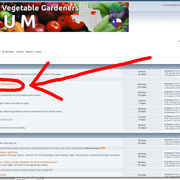
step 1-
Click on a board you want to post in (a good place to introduce yourself is the "Who" board, circled in red in the picture below)


step 2-
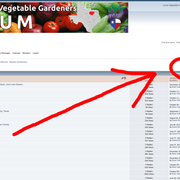
Click on the "New Post" button.  (If you don't see this button, verify you are logged in as a user -- you will see your name and picture (if you uploaded one to your profile) at the top of the page)


step 3-
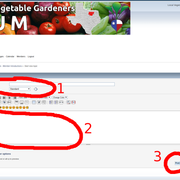
give your post a title, then type your text in the body, then hit the "post" button.


« Last Edit: April 05, 2019, 12:55:26 PM by admin »

Offline Danielreide

  • DanielreideYH
  • Seed (New Member)
  • *
  • Posts: 1
  • Karma: +0/-0
    • Jackpot Bet Game
Re: How to Create a New Post
« Reply #1 on: July 22, 2022, 04:00:21 AM »
Find latest news about Online Casino, New Slots Games and latest Sports Betting trends here At Jackpotbetgame.com
